Thursday, February 28, 2013

Rumor for iPhone 5S or iPhone 6: Bigger, Cheapper and more.

Here are some rumors for the next iPhone, or the next next iPhone. There are some news said Apple will release iPhone 5S this year for upgrade of iPhone 5. Then the rumors today I'd like to talk about is about another one which may be release in 2014.
It has been long to say for Apple will bring a cheaper iPhone to occupate of the low-price market to beat with Samsung. Maybe the one I'll talk about is right the one.
What are the key characteristics will the iPhone 5s or iPhone 6 have? Let's take a look.
1. Plastic handset: The details were published on Thursday by Japanese blog Macotakara, which claims the handset will be made of a material similar to the glossy polycarbonate body Apple used on its entry-level MacBook, which was discontinued after it was replaced at the $999 price point by the 11-inch MacBook Air.
2. Lower Price: Apple is said to be targeting a price of US$330 for the device, though it's unclear if that is an unsubsidized price for the phone or not. The price is really lower than the iPhones before.
3. Bigger Display: Macotakara also reported that Apple is developing a polycarbonate iPhone measuring 4.5-inches, a few stitches more than the 4-inch iPhone 5. Despite the bigger screen, the phone is said to largely take after the rest of the iPhone family - home button under LCD display and all.
That's all the rumors for the cheaper, bigger iPhone for next year.

Tuesday, February 26, 2013

Knowledge Share: What should you do right after lose data?

Hey, Today I'd like to share you what should do when you unluckily meet data loss in your daily life? Here are the proper steps must always be taken in case of a data loss incident, in order to preserve the recoverability of any lost data.

    First of all – put the device in safe place in case any physical damage or re-damage.
    Secondly – immediately stop what you are doing and all type of further data write operations should be avoided to the drive. This also includes starting up the computer. As you know operation system (no matter Windows or Mac OS X) may create “temporary files” or “files required for booting” very quickly. The result is those files may occupy and overwrite the area of the lost data and render it partially or completely unrecoverable. Needless to say, other write operations such as copying, deleting or altering the files should be avoided too.
    Thirdly – if the data loss is caused by software malfunction or human error etc (in a word “non-physical-damage”), immediately pick up data recovery software or Mac data recovery tool to see if you can retrieve some data off the device.
    Lastly – if data loss is caused by natural disaster, send the device or storage media for professional data recovery services.
    Well, the best course of action would be that right upon realizing data loss, the computer must be safely shut down and the problematic drive should be removed from the unit. Then attach the disk to a secondary computer with a write blocker device and then proceed to perform data recovery.

Source From: Goshareware --- data loss solution

Thursday, February 21, 2013

iPhone 5 Wallpaper Share, Part One: Colorful.

Like the title, I would like to share a series of wallpapers for iPhone 5 with the resolution of 640*1136. Today the wallpapers have something in common that is: Colorful.  Hope you like the ones I share for you.

 1. Yellow, Green and Blue
2. Red, Yellow, Blue and Green
3. Geometry
 4. Colorful Ball.
5. Sunshine on the colorful field.
6. Balloon
7,Color wave
8. Curve
  

9. pencil
10. Melody
Tomorrow, I'd like to share another style iPhone Wallpaper. Hope you like the ones I like.

Posts you may like:

Wednesday, February 20, 2013

Little Exciting News: Samsung S IV will release on March 14th.

I have just seen to little exciting news and can not wait to share to you: Samsung is scheduled to unveil the Galaxy S IV on March 14th at a press event in New York City. (From Android and me).
As you know, Samsung S3 is always be compared with iPhone 5 (details on Samsung Note 2 vs iPhone 5 vs Samsung Galaxy S3). And Samsung users account become the largest in the world for smartphones. So the Samsung galaxy S IV will be expected for many android users.
Let's take a look at the latest news for Samsung Galaxy S IV.
According to SamMobile, the Galaxy S IV is rumored to include the “Exynos 5 Octa (8-Core) CPU, Mali-T678 (8-Core) GPU, 4.99″ SuperAMOLED Full HD Resolution Display, 2GB of RAM, 13 Megapixel Rear facing Camera capable of shooting 1080p Full HD Videos at 30FPS, 2 Megapixel front facing camera capable of shooting 720p HD Videos and run Android 4.2.2 Jelly Bean out of the box.”
However, if you are interested in this coming Samsung Galaxy S IV. Let's Just wait until March 14th.

Monday, February 18, 2013

How can you recover Samsung Galaxy S3 deleted photos?

Once you accidentally deleted or lost important photos on your Samsung Galaxy S3, Do not be panic, as the deleted photos never leave the galaxy s3. When a “delete” is performed on the Samsung Galaxy or any other Android phone, only the space that the file occupies is marked as “available” for new pictures or other files.
So there is still huge possibility for you to get them back. 
This post today is going to show you how to do Samsung galaxy s3 photo recovery. It is simple and helpful.
The Data recovery Software I'd like to show you as an example is Hodo Photo Recovery software that is one of the most effective tool to recover deleted/formatted and lost images, videos and audios from digital camera, external hard drives, laptops and desktop, USB Drives, and memory cards.
Let's start the step by step guide for how to recover Samsung S3 lost photos.
1. Free download Hodo Photo Recovery, and install it on a Windows computer.
    You can download Here.
2. Connect your galaxy s3 with computer, launch the photo recovery software, and click on the Recover Photo, Audio, & Video button.
3. In the “Select Media for Recovery” window, you will notice that the SD card and the internal storage are allocated with a drive letter. If not so, make the setting in Samsung Galaxy S3: Settings -> Wireless&Wifi -> USB Tools -> Connect USB mass storage to PC, and then plug Samsung Galaxy device into the PC.
4. Select drive and click “start scan” at right bottom. The software will be able to scan both internal drive and SD card for deleted photos, videos and audio files, with a wide range of file formats supported.
5. Scanning process may take a while if the library is stacked with files, photos or videos. After the scanning, the software lists the deleted files by file type and file extension, check out the recovered photos in the preview window.
6. Locate the photos you’d like to recover, and click “Recover” button to save the recovered files to a specified destination.

Once you met such a problem of losing Samsung Galaxy S3 files. You can do follow this Guide. PS: do remember to do backup for your significant data, so you do not need to do recovery while losing files.

Souce From:  Slideshare

Thursday, January 31, 2013

Three Ways for you to upload PowerPiont files to YouTube.

You may meet this situation, Want to share some slider with others on the web. And you know YouTube is the most popular site. So the problem is -- How to upload PowerPoint to YouTube? Today, Let's share three methods for you.


Method 1 Use Windows Movie Maker
For PowerPoint 2010, you can save it as video directly, in this way, upload PowerPoint to YouTube. But for PowerPoint 2007 and previous versions, you cannot do like that. Luckily, for a plain presentation without animation, transition and inserted music/video, you can use Windows Movie Maker to convert PowerPoint to YouTube free, with all elements in source PowerPoint well kept. Then put PowerPoint on YouTube by the program directly.

Method 2 Convert PowerPoint to YouTube video online

    In previous post, we have introduced Online-Convert.com, which offers the service to convert PowerPoint to video. Here is another site with the similar function. Authorstream.com is a platform for sharing PowerPoint presentations online. After you have uploaded your presentation to Authorstream website, the presentation will be converted into a MPEG4 video (*.mp4). An email notification will be sent to you as soon as your PowerPoint video is ready for downloading from the Web. Then you can upload converted PowerPoint to YouTube.
    However, this conversion process may take some time, and there is limitation on the file quantity and size for free users. As method 1, the output video could only show the plain content without effects.


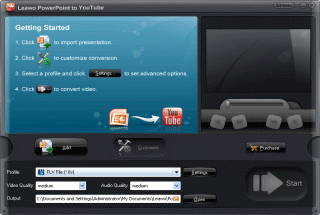
Method 3 Use PowerPoint to YouTube converter
    PowerPoint to YouTube Converter can batch convert PowerPoint for sharing on YouTube and other video-sharing sites like Metacafe, with all the animations, slide transitions, sounds and video clips in the source PowerPoint well preserved. You can also customize the output YouTube video, like inserting background music, adding your own watermark or company logo, and more, and upload PowerPoint to YouTube immediately from the converter.

To sum up, if your PowerPoint slides only contain text and image, it is enough to convert PowerPoint to YouTube free with Windows Movie Maker or a web-based service. If your PowerPoint file is rich with animations, transitions, inserted files and video clips, a professional PowerPoint to YouTube Converter is better.

Source From: Goshareware ---convert PowerPoint to YouTube video.

Monday, January 28, 2013

Free 2013 HD Wallpaper for Laptop.

The December of 2012 is not the end of the world. We ushered in the new 2013, for the new year. We will have our new goals, new life, new opportunity and more new things. Today, I'd like to share Free 2012 new Wallpaper for Laptop. Hope there are some ones you like.

1, 2013 made with fireworks.

2, Cheer up for 2013

3, Colorful 2013 --- Have a Nice year

4, Shining light for 2013

5, Beautiful happy new year 2013.

LinkWithin

Related Posts Plugin for WordPress, Blogger...